Pinecil V2 Review: The Best Portable USB-C Soldering Iron in 2026?
Category: Electronics Tools › Portable Soldering Irons | Updated: March 2026 | ⏱ 14 min read
A $26 Open-Source Soldering Iron With a Cult Following — Is It Deserved?
The Pinecil V2 from Pine64 has become one of the most talked-about tools in the maker community. A portable USB-C soldering iron powered by a RISC-V processor, running fully open-source IronOS firmware, weighing just 30 grams, and costing under $30 — it sounds too good to be true.
But the Pinecil V2 isn't just a novelty. It's a genuine temperature-controlled soldering iron that heats to 350°C in 6 seconds, runs off any USB-C PD charger or power bank, and has a passionate open-source community pushing regular firmware updates with features no traditional station offers — including Bluetooth Low Energy remote monitoring and fully customizable PID tuning.
In this Pinecil V2 review, we put it through real-world soldering tasks: through-hole components, SMD drag soldering, wire splicing, and ground-plane desoldering. We test heat-up speed, thermal recovery, tip compatibility, and compare it head-to-head with the Miniware TS101 — its closest competitor. Let's see if the hype is justified.
The Pinecil V2 is the best portable USB-C soldering iron for makers, field technicians, and open-source enthusiasts. Remarkable performance for its size and price, with the most active firmware community in the soldering world. Not a replacement for a full bench station, but an essential complement to one.
📋 Pinecil V2 — Full Specifications
Here are the complete Pinecil V2 specifications. Pay close attention to the power input options — they directly determine your soldering performance.
| Manufacturer | Pine64 (Pine Store Limited, Hong Kong) |
| Model | Pinecil V2 (green thumb grip, post-Aug 2022) |
| Price (MSRP) | $25.99 (Pine64 store) / ~$40 (Amazon) |
| CPU | Bouffalo BL706 — 32-bit RISC-V @ 144 MHz |
| Firmware | Ralim's IronOS (open source, 31 languages) |
| Max Power | 88W (24V DC) / 65W (20V USB-C PD) / 126W (28V EPR) |
| Temp Range | 100–450°C (212–842°F) |
| Heat-Up Time | ~6 seconds to 350°C (65W USB-C PD) |
| Power Input | USB-C PD 3.0 (12–20V) + DC5525 barrel jack (12–24V) |
| Display | 0.67" monochrome OLED (96×16 pixels) |
| Connectivity | Bluetooth Low Energy (BLE) — PineSAM app |
| Tip Compatibility | TS100 / TS101 / Pine64 short tips (ST series) |
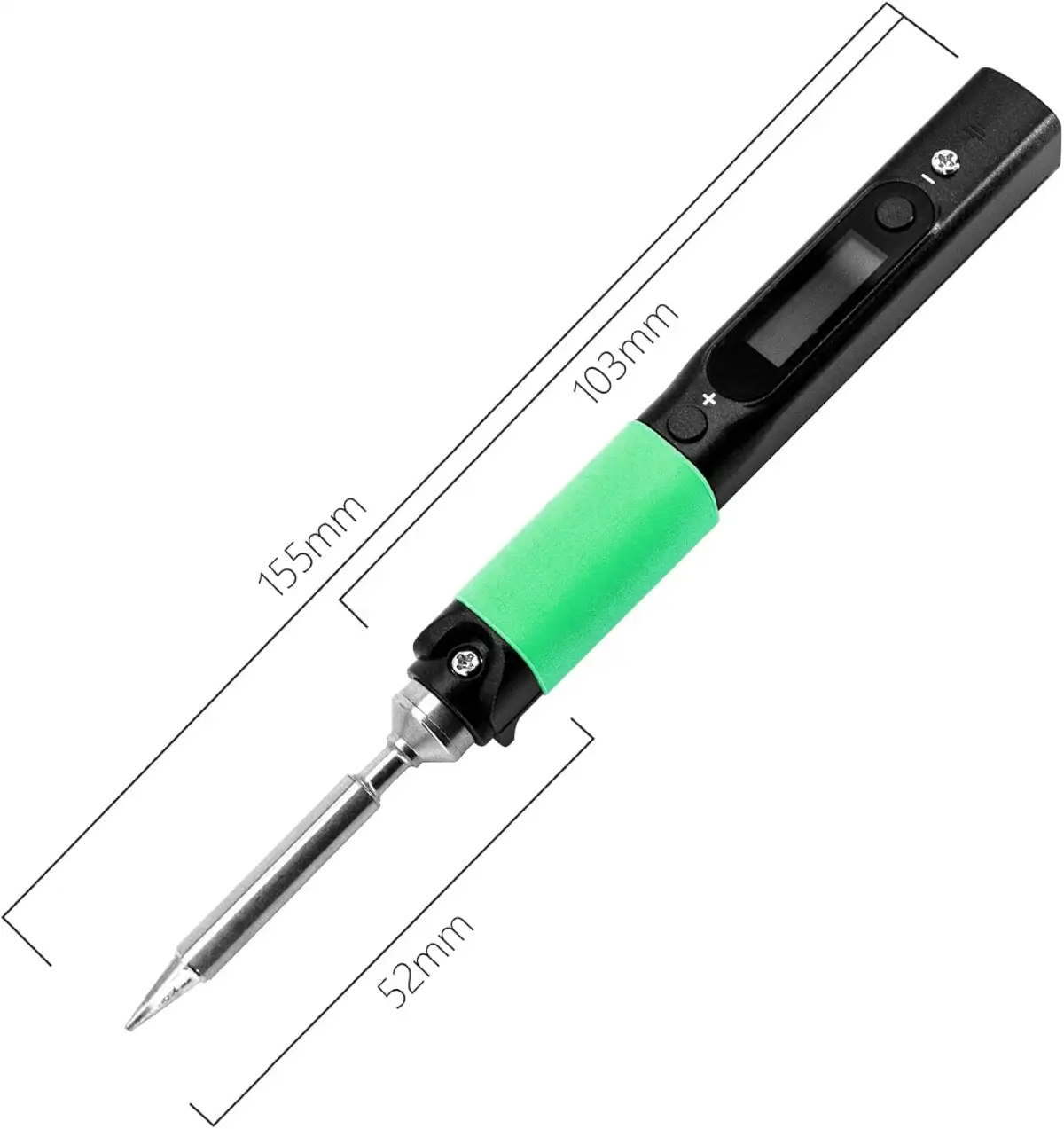
| Weight | 30g with tip / 20g without tip |
| Dimensions | 170mm with tip (98mm body only) |
| Body Material | SAE 304 stainless steel + polycarbonate shell |
| ESD Safe | No (tip is not grounded) |
🌡️ Heat-Up Speed & Thermal Performance
The Pinecil V2's heat-up speed is impressive for a portable iron. Connected to a 65W USB-C PD charger, it reached 350°C in approximately 6 seconds from room temperature — faster than the Hakko FX888D (20 seconds) and Weller WE1010NA (25 seconds). With a 24V DC barrel jack supply, the short-tip (ST) models push up to 88W, bringing heat-up even closer to 5 seconds.
Heat-Up Times by Power Source
| Power Source | Voltage | Max Wattage | Time to 350°C |
|---|---|---|---|
| USB-C PD (65W charger) | 20V | ~65W | ~6 sec |
| DC barrel jack (24V/3A) | 24V | ~88W | ~5 sec |
| USB-C EPR (28V) | 28V | ~126W | ~3 sec |
| QC 3.0 phone charger (12V) | 12V | ~18W | Too slow — not recommended |
Thermal recovery is where the Pinecil shows its limitations. On through-hole joints and thin traces, recovery is instant. But on heavy 2oz copper ground planes, the 65W power ceiling struggles to maintain temperature. The tip drops 40–60°C and takes 3–4 seconds to recover — noticeable compared to the Hakko FX888D's 2 seconds or the JBC's instant recovery on the same test. For occasional ground-plane work, it's manageable. For repeated heavy-duty joints, a bench station is the better tool.
💻 IronOS Firmware — The Pinecil's Secret Weapon
What truly separates the Pinecil V2 from every other portable iron is IronOS — a fully open-source firmware created by Ralim and maintained by an active global community. This isn't a gimmick. IronOS transforms the Pinecil from a simple soldering iron into a programmable precision instrument with features that rival stations costing 10× more.
Key IronOS Features
🔧 Tip Ecosystem & Compatibility
Choosing the right Pinecil V2 tips is essential for getting the best results. The Pinecil V2 uses TS100-compatible tips, which means you have access to a massive ecosystem of affordable replacement tips from both Pine64 and third-party manufacturers. Tips are secured with an M2 screw and swap in seconds.
Two Tip Families
| Tip Type | Resistance | Max Power | Notes |
|---|---|---|---|
| Pine64 Short Tips (ST) | 6.2Ω | 88W @ 24V | Shorter, higher power, designed for V2 |
| TS100 Long Tips | 8Ω | 65W @ 24V | Longer reach, widely available, lower cost |
Recommended Tips for Different Tasks
| Task | Tip Shape | Model |
|---|---|---|
| General through-hole | Chisel 2.4mm | ST-D24 / BC2 |
| Fine SMD work | Conical fine | ST-B2 / TS-B2 |
| SMD drag soldering | Knife / Hoof | ST-K / TS-K |
| Wire splicing / connectors | Chisel 4mm | TS-D40 |
⚔️ Pinecil V2 vs Miniware TS101 — Head-to-Head
The Miniware TS101 is the Pinecil V2's most direct competitor. Both are portable USB-C soldering irons with temperature control and TS100-compatible tips. Here's how they compare:
| Feature | Pinecil V2 | Miniware TS101 |
|---|---|---|
| Price | ~$26–$40 | ~$70–$85 |
| Firmware | IronOS (open source) | Proprietary + IronOS compatible |
| Display | 0.67" OLED (96×16) | 0.91" OLED (128×32) |
| Max Power | 88W (DC) / 126W (EPR) | 65W |
| Bluetooth | Yes (BLE) | No |
| CPU | RISC-V (open architecture) | STM32 (ARM) |
| Tip Compatibility | TS100 + Pine64 ST | TS100 |
| Build Quality | Good (polycarbonate + steel) | Better (full aluminum) |
| Included Cable | No cable included | USB-C cable included |
🔌 Choosing the Right Power Supply for Pinecil V2
The Pinecil V2 ships with no cable and no power supply — just the iron and one tip. Choosing the right Pinecil V2 power supply is critical because it directly determines the performance of your USB-C PD soldering iron.
Recommended Power Sources (Ranked)
| Power Source | Watts | Performance | Best Use |
|---|---|---|---|
| 65W+ GaN USB-C charger | 65W | ⭐⭐⭐⭐⭐ Excellent | Desk / bench work |
| 24V/3A DC barrel supply | 72–88W | ⭐⭐⭐⭐⭐ Best thermal | Maximum power at bench |
| USB-C PD power bank (20V) | 45–65W | ⭐⭐⭐⭐ Very good | Portable / field work |
| 45W laptop USB-C charger | 45W | ⭐⭐⭐ Good | Travel / shared charger |
| QC 3.0 phone charger | ~18W | ⭐ Insufficient | Not recommended |
🧪 Real-World Testing Results
Through-Hole Components
The Pinecil V2 excels at through-hole work. Arduino headers, resistors, capacitors, IC sockets — all soldered cleanly and quickly at 320°C with the ST-D24 chisel tip. The lightweight body and pencil-like grip provide excellent control for pin-by-pin work. On a full Arduino shield build (68 joints), joint quality was indistinguishable from our Hakko FX888D results.
SMD Work (0805 and SOIC)
For 0805 passives and SOIC packages, the Pinecil performs surprisingly well. The fine conical tip (ST-B2) places solder precisely, and the fast heat response prevents heat damage to nearby components. Drag soldering on SOIC-16 and TQFP-44 with the knife tip worked — though the tiny OLED display makes it harder to monitor temperature during delicate work compared to a station with a full LCD.
Heavy Copper / Ground Planes
This is where the Pinecil V2 struggles. On a 2oz copper ground plane with thermal relief, it took noticeably longer to achieve proper flow — the tip temperature drops significantly and recovery is slower than any bench station. Using the boost mode (+20°C) helps, but it's a workaround rather than a solution. For regular ground-plane work, you want a 70W+ bench station.
Wire Soldering & Connectors
Soldering 18AWG stranded wire to barrel connectors and XT60 plugs was manageable with the D24 chisel tip at 380°C. The Pinecil handled it, but required slightly longer contact time than a bench station. For occasional wire work, it's perfectly adequate. For production cable harness assembly, use a station.
✅ Who Should Buy the Pinecil V2 (And Who Shouldn't)
The Pinecil V2 is the best portable soldering iron for electronics fieldwork and maker projects — but it's not for everyone. Here's an honest breakdown:
✔️ Value open-source firmware and community-driven development
✔️ Need a secondary iron alongside your bench station
✔️ Already own a 65W+ USB-C charger
✔️ Build Arduino, Raspberry Pi, or keyboard projects
✔️ Want Bluetooth monitoring for precision work
✔️ Appreciate the RISC-V open architecture philosophy
✖️ Work primarily on heavy ground planes
✖️ Solder 4+ hours daily (ergonomics of bench iron is better)
✖️ Want a complete out-of-the-box experience with cable & tips
✖️ Do production-volume soldering
✖️ Need to solder in an environment without USB-C power
❓ Pinecil V2 — Frequently Asked Questions
✅ Pinecil V2 Review — Final Verdict
The Pinecil V2 delivers a proposition no other soldering iron can match: genuine temperature-controlled performance in a 30-gram package, powered by any USB-C charger, running fully open-source firmware with Bluetooth connectivity — for under $30. It won't replace a Hakko or JBC on your bench, but it wasn't designed to. It's the iron you grab for quick fixes, field repairs, hackerspace builds, and travel. Every electronics workbench should have one.
This review is part of our Best Soldering Station for Electronics 2026 series. The Pinecil V2 earned our "Best Portable" award.